Your support inbox — now in your pocket
Take over AI handovers, reply to visitors and keep an eye on tickets, even when you are away from your desk. The SilentChat app for iPhone and iPad is free in the App Store.
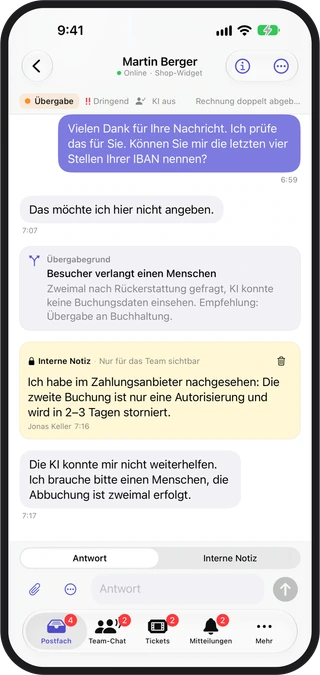
Recording from the app with sample data, not a real customer conversation. The interface shown is German; the app is also available in English.
In short
The SilentChat app for iPhone and iPad puts the inbox, AI handovers, tickets, team chat, contacts and copilot in your pocket. Support agents take over conversations on the go and reply to visitors. The app is free and needs an existing SilentChat account. According to its App Store listing, it contains no ads, no tracking and no analytics services.
The app in 20 seconds
From the inbox into a conversation after handover, on to the copilot, team chat, tickets and contacts. No sound, on a loop — with controls to pause it.

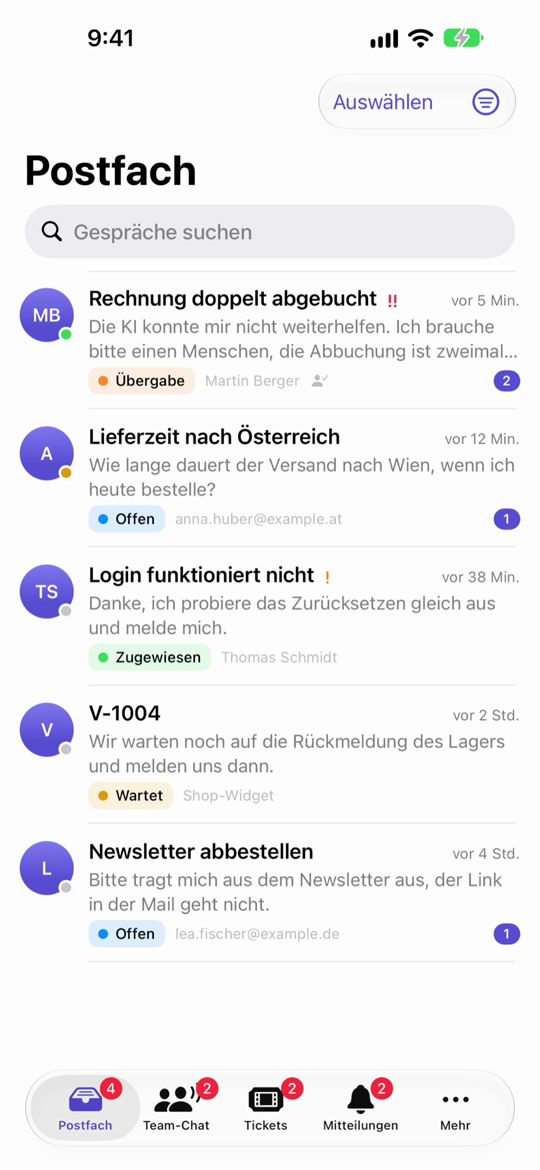
Every conversation at a glance — on the go
The inbox shows every active conversation with status, priority and unread messages, plus a preview of the latest message and the time.
- Status, priority and a counter for unread messages
- Accept AI handovers, assign, close and reopen conversations
- Translate visitors' messages into your language
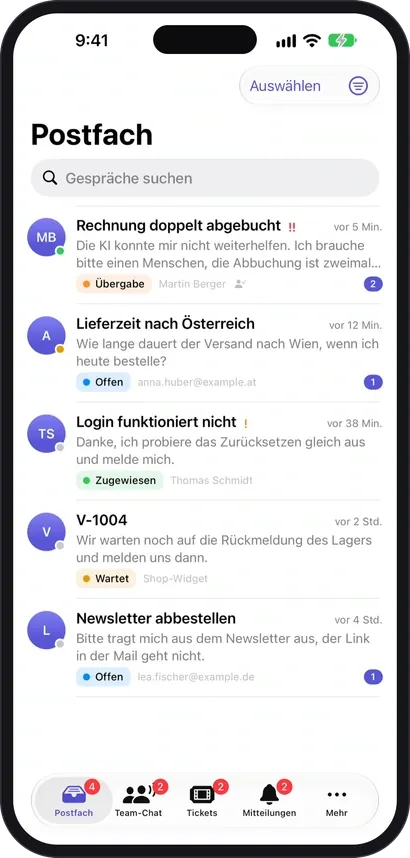
Handovers —with the reason attached.
When the AI hands a conversation to your team, you see not only the history but also why.
Internal notes · Text snippets · Attachments · Reactions
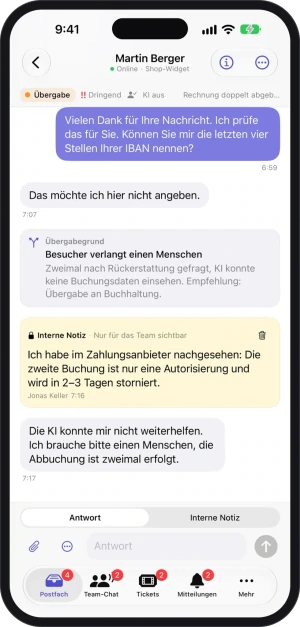
- Status at a glanceHandover, urgency, AI on or off
- Handover reasonWhy the AI handed over
- The whole historyIncluding what was written with the AI before
- Internal noteVisible to the team only
Let it suggest replies — you decide
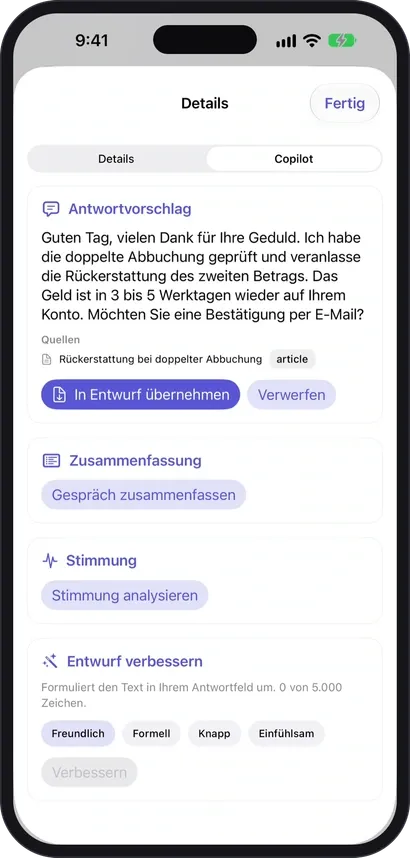
The copilot drafts a suggestion and names the knowledge base article it relies on. You take it into the draft or discard it — only what you confirm is sent.
- Summary and mood of the conversation
- Polish drafts in the tone you want: friendly, formal, concise or empathetic
- Dictation straight into the draft — if your plan includes it
Your team stays within reach
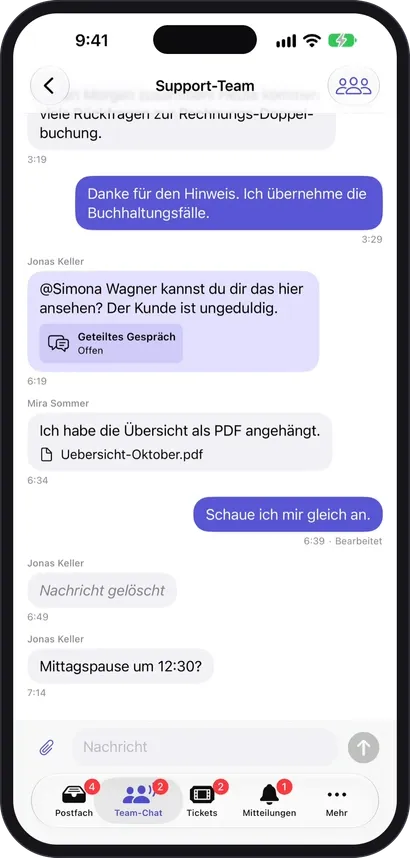
Groups and direct messages, mentions and shared conversations: ask a colleague without leaving the app.
- Channels and direct messages
- Mention colleagues, share conversations
- Attach files
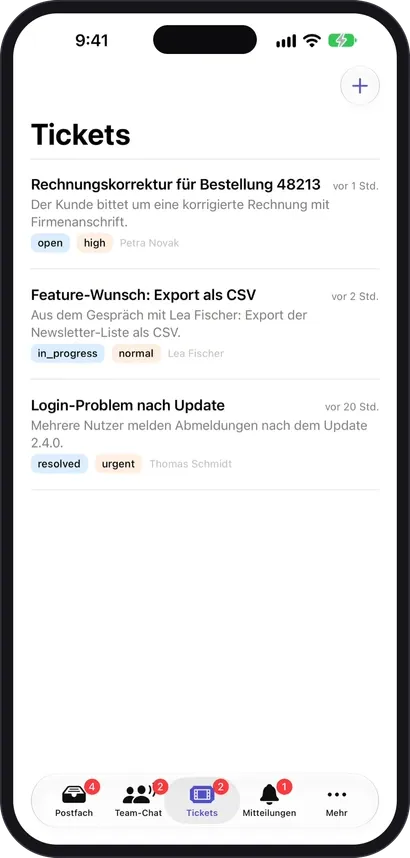
Work on tickets on the go
Create, comment on and resolve tickets — the list shows status, priority and the person responsible at a glance.
- Create, comment, resolve
- Status and priority in the list
- Person responsible per ticket
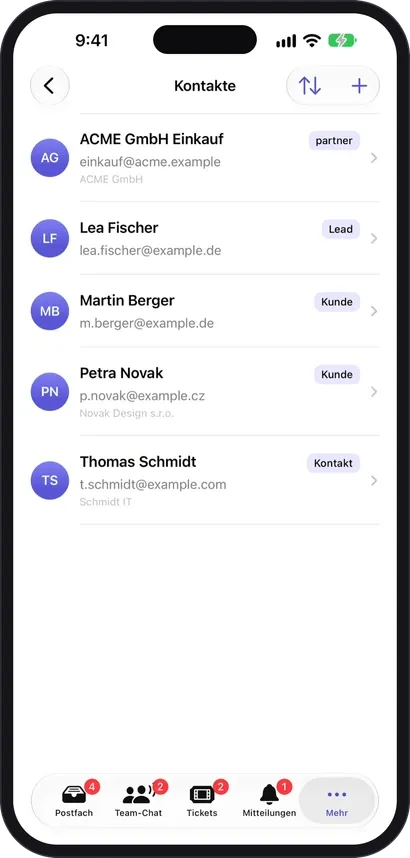
Know who you are writing with
Contacts and live visitors with history: the list shows name, email, company and the kind of contact.
- Contacts with company and label, such as customer, lead or partner
- Live visitors with history
What it takes off your team's plate
Handovers left waiting
When the AI hands a conversation to your team, you take it over wherever you are — not only at your desk.
Switching between tools
Inbox, tickets, team chat, contacts and live visitors in one app.
Replies nobody confirmed
The copilot suggests and polishes drafts; only what you confirm is sent.
App Store · iPhone and iPad
Get it now.Free.
The SilentChat app is in the App Store. Sign in with your company's account, take over handovers, reply.
- Free
- Price
- iOS 17
- or later
- 5.9 MB
- Size
- DE · EN
- Languages
 The app requires an existing SilentChat account at your company. Accounts are created in the web dashboard.
 The app in 20 seconds
Four steps to the app
Download
Search for “SilentChat” in the App Store or use the badge on this page.
Sign in
With your company's SilentChat account.
Take over
Accept AI handovers, assign conversations.
Reply
Write to visitors, leave notes, ask the copilot for a suggestion.
Data protection and the iOS app
For your work, the app connects to SilentChat's servers in Germany — the same ones the dashboard in the browser uses.
According to our App Store listing, the app contains no ads, no tracking and no analytics services. Your credentials are stored in the device's keychain.
Notifications on the lock screen do not show the message text by default. If the device lies on a table, others see only that something arrived, not what a visitor wrote.
The App Store listing names the following data as linked to you: email address, name, user content (photos or videos, customer support, other) and user ID, each for the app's functionality; audio data is not linked to you. These are the developer's statements; Apple has not verified them.
Read more in: Privacy policy · Security · All facts at a glance
Frequently asked questions
The app itself is free in the App Store. It works with your company's SilentChat account; what you can use in it depends on that account's plan.
Yes. The app requires an existing account at your company. You create accounts in the web dashboard, then sign in to the app.
On iPhone and iPad with iOS or iPadOS 17.0 or later. The app is about 6 MB and available in German and English.
Currently only for iPhone and iPad. On other devices the dashboard runs in the browser, and for Windows there is the desktop app.
Not by default: notifications on the lock screen do not show the message text. They only say that something arrived.
No, the app is meant for work on the go: inbox, handovers, tickets, team chat, contacts and copilot. You still do settings and setup in the dashboard.
Goes well with
Last updated: 23 October 2026
No account yet?
The app works with your SilentChat account. Create one for free, then sign in to the app.